
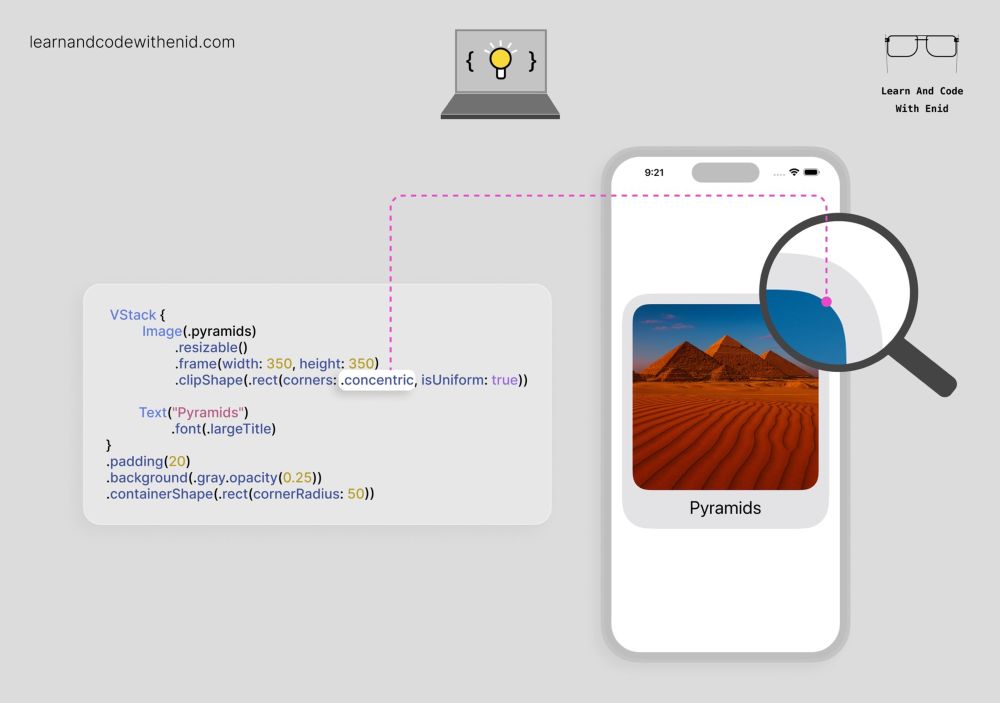
SwiftUI Tip 💡
In iOS 26, you can apply concentric rounded corners to keep child views visually consistent with their parent.
→ learnandcodewithenid.com
17.12.2025 10:01
👍 3
🔁 1
💬 0
📌 0
SwiftUI Tip 💡
In iOS 26, you can apply concentric rounded corners to keep child views visually consistent with their parent.
→ learnandcodewithenid.com

SwiftUI Tip 💡
Easily customize tab bar badge colors (normal & selected) with a few UIKit lines of code.
→ learnandcodewithenid.com

SwiftUI Tip 💡
Use keyboardType() to show the most appropriate keyboard for your input.
(Updated for iOS 26 design)
→ learnandcodewithenid.com
Super useful! I did not know about this until now, thanks!

SwiftUI Tip 💡
In iOS 26+, you can add ticks to a Slider using the ticks parameter.
Perfect for things like brightness, volume, or progress levels.
→ learnandcodewithenid.com

SwiftUI Tip 💡
Use submitLabel() to change the keyboard’s submit button to options like Next, Join, Search, or Done.
(Updated for iOS 26)
→ learnandcodewithenid.com

SwiftUI Tip 💡
Instead of using multiple Spacer views to center content, you can simply use a view’s frame() modifier.
→ learnandcodewithenid.com

SwiftUI Tip 💡
You can create nested menus simply by placing a Menu inside another Menu.
→ learnandcodewithenid.com

Xcode Tip 💡
Not ready for Liquid Glass yet? Temporarily fall back to the classic UI by setting:
UIDesignRequiresCompatibility → YES
in your app’s Info.plist.
→ learnandcodewithenid.com

SwiftUI Tip 💡
In iOS 26.0+, we have two new button roles: .close and .confirm.
→ learnandcodewithenid.com

SwiftUI - Understanding DatePicker (Part 3) is now available to LACWE members 🎉
4 new visuals
→ learnandcodewithenid.com

SwiftUI Tip 💡
You can add a custom preview to your context menu using the 'preview' parameter.
Perfect for showing more details before the user chooses an action.
→ learnandcodewithenid.com

SwiftUI - Understanding DatePicker (Part 2) is now available to LACWE members 🎉
4 new visuals
→ learnandcodewithenid.com

SwiftUI Tip 💡
By default, containers like VStack apply built-in spacing.
You can remove it by passing 0 to the spacing parameter.
→ learnandcodewithenid.com

SwiftUI Tip 💡
In iOS 17.0+, use listSectionSpacing() to control the vertical space between sections in a List.
→ learnandcodewithenid.com

SwiftUI Tip 💡
In iOS 17.0+, use the badgeProminence() modifier to control how noticeable a badge appears.
→ learnandcodewithenid.com

SwiftUI Tip 💡
By default, a scroll view clips anything that extends past its bounds.
In iOS 17.0+, use scrollClipDisabled() to let items extend beyond the scroll view’s bounds.
→ learnandcodewithenid.com

🚀 As always, new chapters, lessons, and updates are on the way.
You can join with a 50% lifetime discount on the yearly plan — the offer expires soon.
→ learnandcodewithenid.com

SwiftUI Tip 💡
In iOS 26.0+, you can finally display a subtitle in the navigation bar using the navigationSubtitle() modifier.
→ learnandcodewithenid.com

SwiftUI Tip 💡
In iOS 17.0+, use navigationLinkIndicatorVisibility() to control whether a NavigationLink shows its disclosure indicator.
Perfect for cleaner lists, or when you want full control over row styling.
→ learnandcodewithenid.com

SwiftUI - Understanding DatePicker (Part 1) is now available to LACWE members 🎉
5 new visuals
→ learnandcodewithenid.com
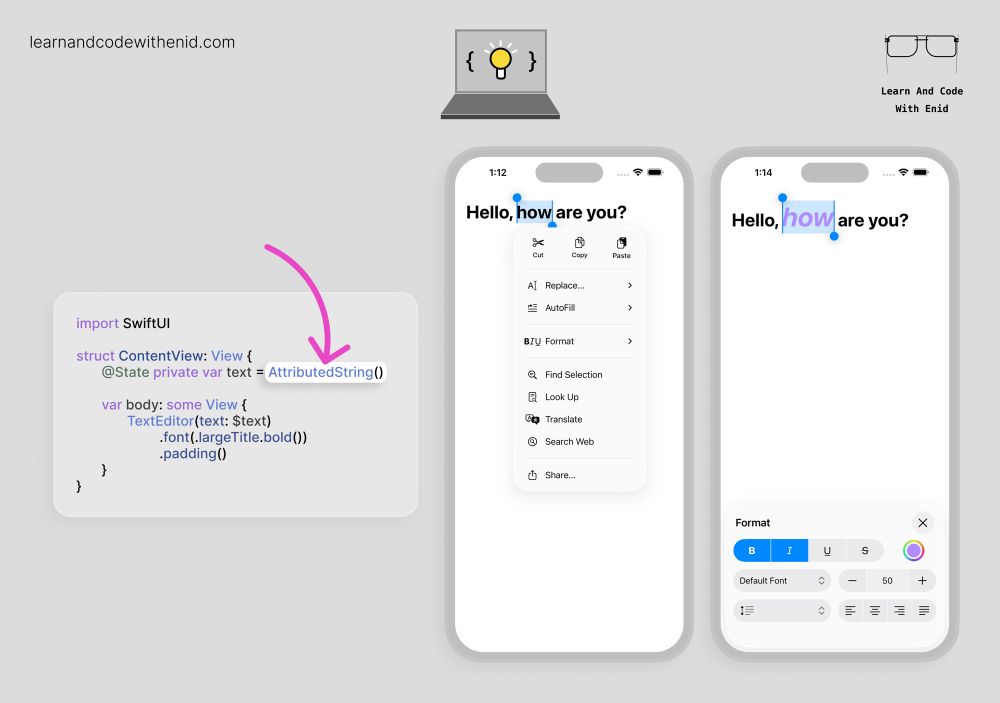
SwiftUI Tip 💡
In iOS 26.0+, TextEditor supports rich text editing when you bind it to an AttributedString.
This instantly unlocks system-native formatting tools - bold, italics, underline, colors, alignment, and more.
→ learnandcodewithenid.com

SwiftUI Tip 💡
In iOS 17+, you can choose where your scroll view starts scrolling from using defaultScrollAnchor().
For example, use .top to begin at the start, or .bottom to jump to the latest content - perfect for chat views or message feeds.
→ learnandcodewithenid.com

SwiftUI Tip 💡
You can control where the popover’s arrow appears - top, bottom, leading, or trailing - using the arrowEdge parameter.
Perfect for creating context-aware popovers.
→ learnandcodewithenid.com

SwiftUI Tip 💡
In iOS 16.0+, use MultiDatePicker to let users select multiple days at once.
Perfect for booking flows, habit trackers, or any calendar-driven experience.
→ learnandcodewithenid.com

SwiftUI Tip 💡
In iOS 18.0+, use the .mix() modifier to blend two colors into a new one.
Great for creating custom backgrounds, smooth gradients, or dynamic themes on the fly.
→ learnandcodewithenid.com

SwiftUI Tip 💡
You can place a toolbar with items above the keyboard by using the .keyboard placement.
Perfect for AI chat apps, note-taking apps, and any interface with quick actions while typing.
→ learnandcodewithenid.com

SwiftUI Tip 💡
Did you know? When using the Liquid Glass design, you can apply it to any custom shape.
→ learnandcodewithenid.com

SwiftUI Tip 💡
In iOS 17.0+, use .pickerStyle(.palette) to display your picker as a horizontal palette of options.
→ learnandcodewithenid.com
