
NavigationSplitView has its own chapter 😅
04.01.2026 10:47
👍 2
🔁 0
💬 0
📌 0
NavigationSplitView has its own chapter 😅
ALSO, here is a link to my SwiftUI wrapper for PDFKit's PDFView. It's open-source and lets you test out some of these techniques in practice. 😎
github.com/DannyBehar/P...

My first full-length talk is live on YouTube! Learn some techniques for wrapping UIKit components with SwiftUI for ease of use and reusability. Thank you, DevCommunity and DC iOS, for hosting me for my first full-length talk!
www.youtube.com/watch?v=8z2A...
Yea exactly. In my experience I’ve just used it as a means to get access to that SwiftUI state from the coordinator.
You could also pass in an EnvironmentObject or a Bindable if you are using SwiftUI Observable. Take a look at this link: GitHub.com/dannybehar/PDFViewer
Perhaps you could inject this event array into your representable using an environment value. Or if your UIKit component needs to update this array, maybe you could use a Binding
But the useful thing the parent can access is the ‘state’ that is attached to that descriptor. Things like a Binding which is stored separately from the view description and managed by SwiftUI or environment values which are read only props injected into view hierarchy.
I just gave a talk on this topic last night at the DC iOS meetup! Will post a link to a PDFView wrapper that I sent everyone home with. I think of it like the SwiftUI view structs are kind of like descriptor metadata, they describe the view and our being recreated a bunch since they are value types.
Wohoo!! 🎉 Congrats Stephen!
Wow I didn’t even know about that modifier. I could also use that functionality but maybe I should hold off for now 😅
Yea it works if your device is running 18 or 17. the issue is when your device is running 26. Thanks for checking

Still no icon showing up for Tutti on the iPadOS 26 App Store.
Hurts to spend months working on a release and then have this happen. If you work for Apple and/or have any idea how to resolve, I'd appreciate the help <3

Tutti 3.1 is now available on the App Store!
Updated for iPadOS 26 and Liquid Glass
Tutti makes it easy to organize, practice, and perform using your PDF sheet music!
Available on the iPadOS App Store here:
apps.apple.com/us/app/paper...
My app Tutti, a sheet music reader for iPad, has an update coming out Tomorrow (pending app review).
It’s being updated with the new design and Liquid Glass! If you read music, give it a try and let me know what you think!
Here is a video demo showing off the new design.
gettutti.app
What are the deets for the speaker on the iPhone Air. Does it require headphones? I couldn't find anything on Apple's website about it.


The time has come! Sage RPG is here! 🎉
Sage RPG is a tabletop RPG management tool, built to help you keep track of and manage your homebrew characters, maps, notes and more. Take a look at some dev pics!
Built for iOS, iPadOS, Vision OS and MacOS!
TestFlight testflight.apple.com/join/MPP1GK1W
If the AI consistently goes tries to go in a direction that I know is a dead-end, I'll update the overall project prompt to better steer it for future prompts. I'm starting to see the future of software development and I kind of like it?
If I find a certain section that I don't understand, I'll pepper GPT-5 with specific questions to get a better sense.
So I'm currently vibe coding a new PDF Viewer for Tutti that is built on top of the PDFKit utility classes. GPT-5 is so far doing really well. I've started to settle into a flow: Vibe code a small piece of functionality, and then review the code to find ways to simplify and reduce complexity.
GPT-5 was super impressive this morning and now around lunch time EST it's acting more like GPT-3 and the website is barely responsive. Guessing there is huge demand with the new model being released. Anyone else experiencing the same?
This is so epic 🚀
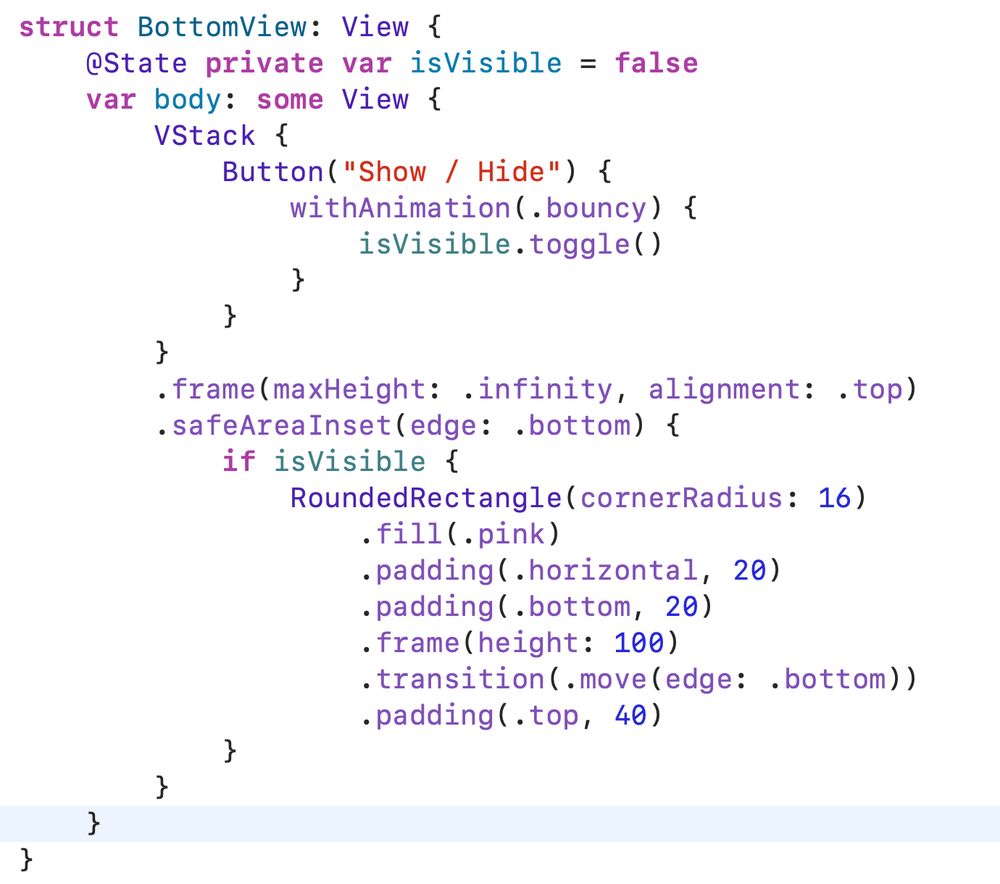
struct BottomView: View { @State private var isVisible = false var body: some View { VStack { Button("Show / Hide") { withAnimation(.bouncy) { isVisible.toggle() } } } .frame(maxHeight: .infinity, alignment: .top) .safeAreaInset(edge: .bottom) { if isVisible { RoundedRectangle(cornerRadius: 16) .fill(.pink) .padding(.horizontal, 20) .padding(.bottom, 20) .frame(height: 100) .transition(.move(edge: .bottom)) .padding(.top, 40) } } } }
I usually have to play around with the padding in order to get around this issue. Try something like this.. breaking up the padding before the transition and add back some top padding after the transition. This seems to have worked for me.
Tutti v3.0 is now available on the app store!
I've been working really hard on this update. So happy it's finally out in the world! It includes:
- A new split-view design
- Dark mode support across the app
- A new onboarding experience
- lots of smaller tweaks, animations, and bug fixes
oooh... thats a great idea. I may try something similar for Tutti.
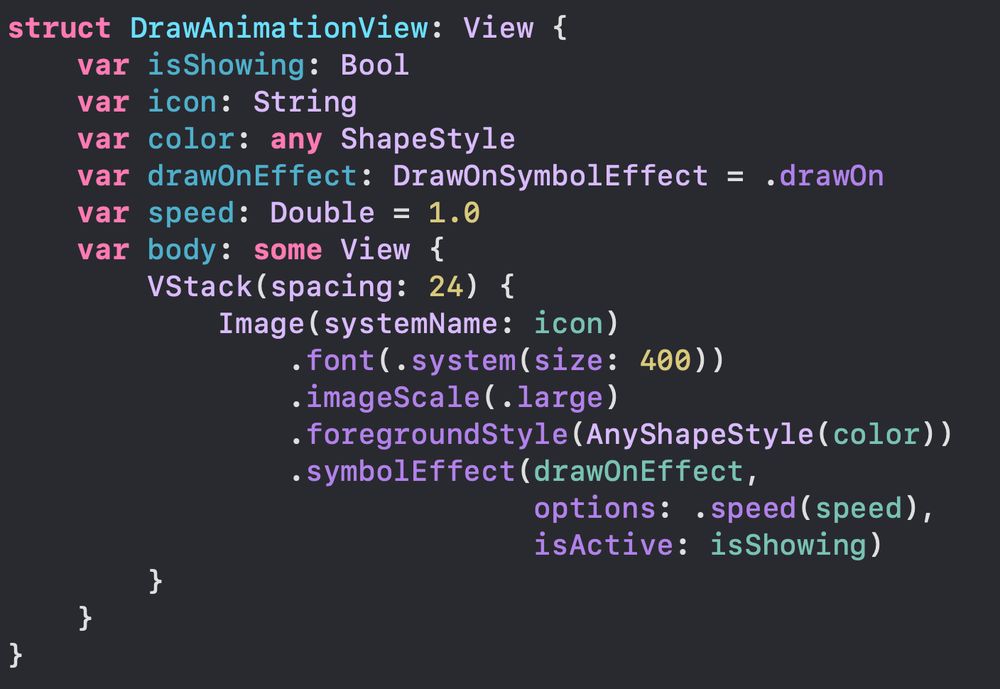
struct DrawAnimationView: View { var isShowing: Bool var icon: String var color: any ShapeStyle var drawOnEffect: DrawOnSymbolEffect = .drawOn var speed: Double = 1.0 var body: some View { VStack(spacing: 24) { Image(systemName: icon) .font(.system(size: 400)) .imageScale(.large) .foregroundStyle(AnyShapeStyle(color)) .symbolEffect(drawOnEffect, options: .speed(speed), isActive: isShowing) } } }
And now the code! This is the code I used to make all of these examples. Pass in the color, icon string, effect, and speed:
Be creative. You can mix this effect with other features of SwiftUI to create wonderful experiences for your users.
This effect is flexible! For example, you can tell the effect to draw each layer individually by applying the symbol effect like this: .symbolEffect(.drawOn.individually,
isActive: isShowing)
Another great example: "scribble.variable" with a .green.gradient foregroundStyle. Showcasing another new addition to iOS 26. Gradient foregroundStyles on symbols!
The "signature" SFSymbol showcases this effect so well.
New in SFSymbols for iOS 26, Draw effects!!
Five beautiful examples.. stay till the end for the code sample.
First up, "rainbow" with .symbolRenderingMode(.multicolor). Symmetrical symbols draw outward from the center.


