

RemNote 1.23 includes 927 unique improvements and fixes, to every corner of the app! We won’t stop until every corner of RemNote feels instant, powerful, and joyful to use.
15.02.2026 15:28
👍 3
🔁 0
💬 0
📌 0
RemNote 1.23 includes 927 unique improvements and fixes, to every corner of the app! We won’t stop until every corner of RemNote feels instant, powerful, and joyful to use.

You can now type /metadata on any bullet to see information about when the bullet was created, and any card scheduling information.

Accidentally erase something? Open up the trash for any individual handwritten document to restore it.

The new daily notes page is cleaner, helping you focus on your work. It also emphasizes templates, which you can use to structure your day.

We've fully rebuilt the editor print engine. The new engine supports dynamic screen sizes and layouts, and smoothly handles documents with many images.

We've revamped the sidebar for a cleaner, more focused experience.

Our new AI-Card generation experience gives higher-quality cards, is easier to use, gives more visibility into AI credits, and makes citations easier to access.

We’ve added a new mobile sync indicator at the top of the homepage, flashcards page and notes page, to give you visibility into if you’re fully synced or not.

RemNote mobile now loads even faster, uses less memory, and gets you back into studying faster.

The flashcard home now loads instantly on mobile. Jump into practicing any folder without delay.

How did your knowledge grow this year? Look back over your year at remnote.com/wrapped !

⚠️ “Correctness” Insight
If your cards have a typo or seem misleading, we’ll now warn you and suggest an improvement.

You can now study documents or folders without recording your answer choices. This will let you practice without impacting the cards’ spaced-repetition history – useful if you want to preview newly created cards or let someone else in a study group try your flashcards.

🔒 Locked Tabs
Want a tab that’s always available for your todos, a dashboard, your daily notes, etc?
Right-click it and choose “Lock”. Locked tabs will always stay open, even if you navigate to another document.

RemNote now has built-in tabs!
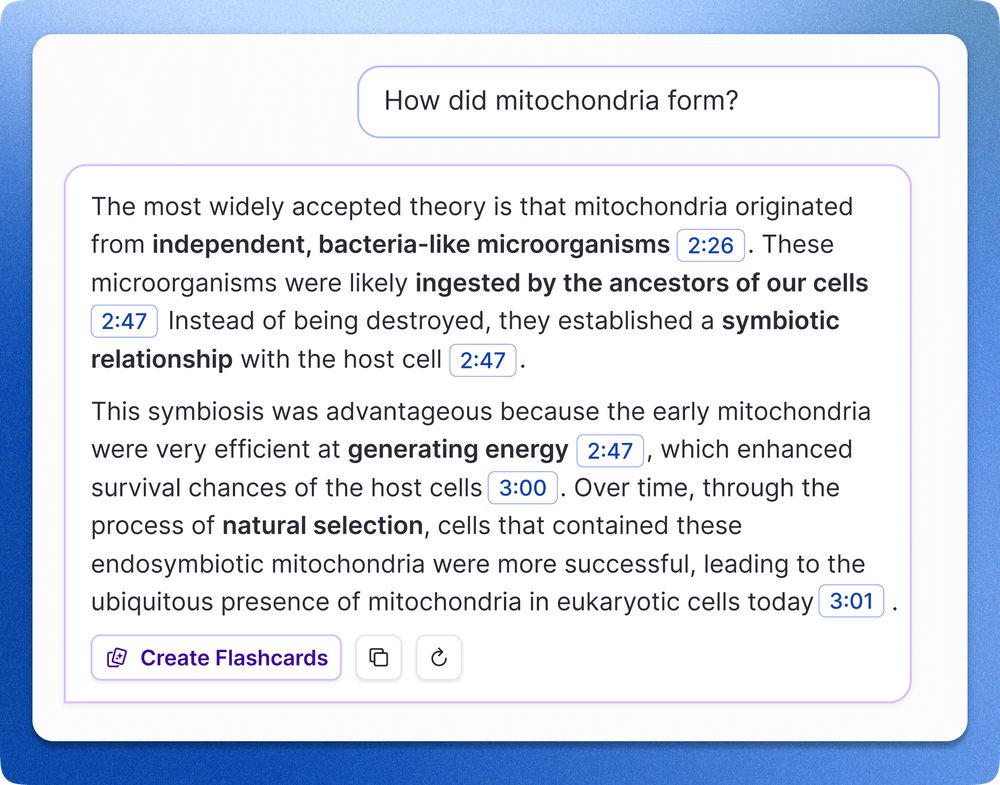
Chat with your audio files! Record audio in RemNote, or upload an existing one. Ask the AI tutor a question, and get a grounded response with timestamps.

While recording a lecture, you can click on any confusing bullet to get an immediate explanation.

Notes you take while using the lecture recorder will be automatically linked to the corresponding timestamps in your lecture, so you can go back and listen for more context.

The new Lecture Recorder automatically summarizes key insights for you. View the raw transcript or the bullets, and never miss a key detail again.

You can now record audio from lectures and get a live transcription!
🎉 RemNote 1.21 is here! 🎉
🎤 Lecture Recorder
🗂️ Tabs
🧠 Study Without Recording Answer Choices
⚠️ Card Correctness Checks
💅 Tons of Polish and Fixes
... and more!
➡️ RemNote dot com

We’ve comprehensively translated the entire app! Translations are currently available for Brazilian Portuguese, Chinese, German, Polish, and Russian.

We’ve revamped the slash menu, making it cleaner and more compact.
Your editor should expand with your thoughts, not constrain them.
RemNote automatically keeps your bullets in view by horizontally scrolling on large documents:
Scrolling and editing is much faster on mobile, letting you easily scroll through long or deeply-nested documents. No more crazy jittering.
⚡️ New Lightning Editor Engine!
We want every action in RemNote to feel instant (0.1 seconds or less). We’re one step closer to that goal with our new “lightning” editor rendering engine:
- Fast document loading
- Fast rendering and manipulation
- Smooth mobile scrolling
- Improved interactions

In the latest update, you can easily customize your PDF's appearance, in both normal and Text Reader mode! Adjust theme, font, font size, and line height.
In the latest update, you can listen to your PDF documents and webpages with high-quality text-to-speech!
Switch to Text Reader mode, then select “Listen with text to speech” in the top-right menu to activate.
As you listen, you can take notes, add highlights, 1-click create cards, and more.
Easily navigate up/down with your keyboard while reading in the new PDF Text Reader!

Text in the new PDF Text Reader nicely wraps on mobile screens. No need to squint trying to read tiny PDFs!


